Attachments and naming
The Attachments page tells the app where the files of the records are and how to name them. You need it before you download files.
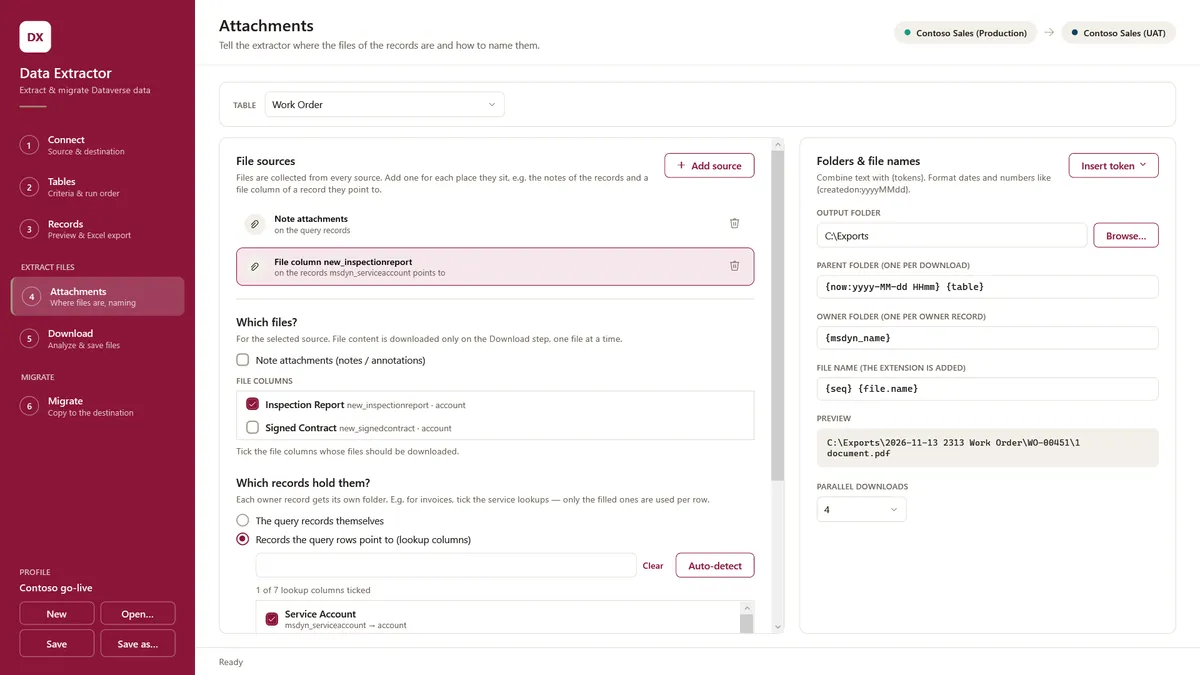
File sources
Section titled “File sources”A file source describes one place where files are found. Start with one, and select + Add source to collect files from one more place, for example the notes of the records plus a file column of a record they point to. A file found by two sources is saved once.
For each source, choose:
Which files?
- Note attachments (notes / annotations).
- File columns: tick the file columns to include.
Which records hold them?
- The query records themselves (default).
- Records the query rows point to (lookup columns): tick the lookups to follow. Only filled lookups are used per row. Auto-detect ticks the lookups whose table can own records of the child table.
Child records (optional)
Tick The files sit on child records of the owner (e.g. activities), then choose the Child table and Its column pointing to the owner. For activities, use regardingobjectid.
The flow for each source is: query row → owner record (itself or via a lookup) → child records (optional) → notes and file columns → files.
Output folder and naming
Section titled “Output folder and naming”- Output folder: where downloads go. The default is your Documents folder.
- Parent folder (one per download): default
{now:yyyy-MM-dd HHmm} {table}, for example 2026-11-24 1430 Account. - Owner folder (one per owner record): default
{parent.entityDisplay} - {parent.name}, for example Account - Contoso Ltd. - File name (the extension is added): default
{file.name}, the original file name.
Templates combine text with tokens in braces. Select Insert token to see the tokens available for the current source:
| Token | Value |
|---|---|
{now} |
The current date and time. Add a format: {now:yyyyMMdd}. |
{table} |
The display name of the table. |
{parent.entityDisplay} |
The table name of the owner record. |
{parent.name} |
The name of the owner record. |
{file.name} |
The original file name, without the extension. |
{columnname} |
Any column of the query record, for example {accountnumber}. Dates accept a format: {createdon:yyyyMMdd}. |
The Preview box shows the full path of an example file as you type.
Parallel downloads
Section titled “Parallel downloads”Parallel downloads sets how many files are downloaded at the same time: 1, 2, 4 (default), 6 or 8.