Migration settings
Every table has its own migration settings, on the Migration settings tab of the Tables page.
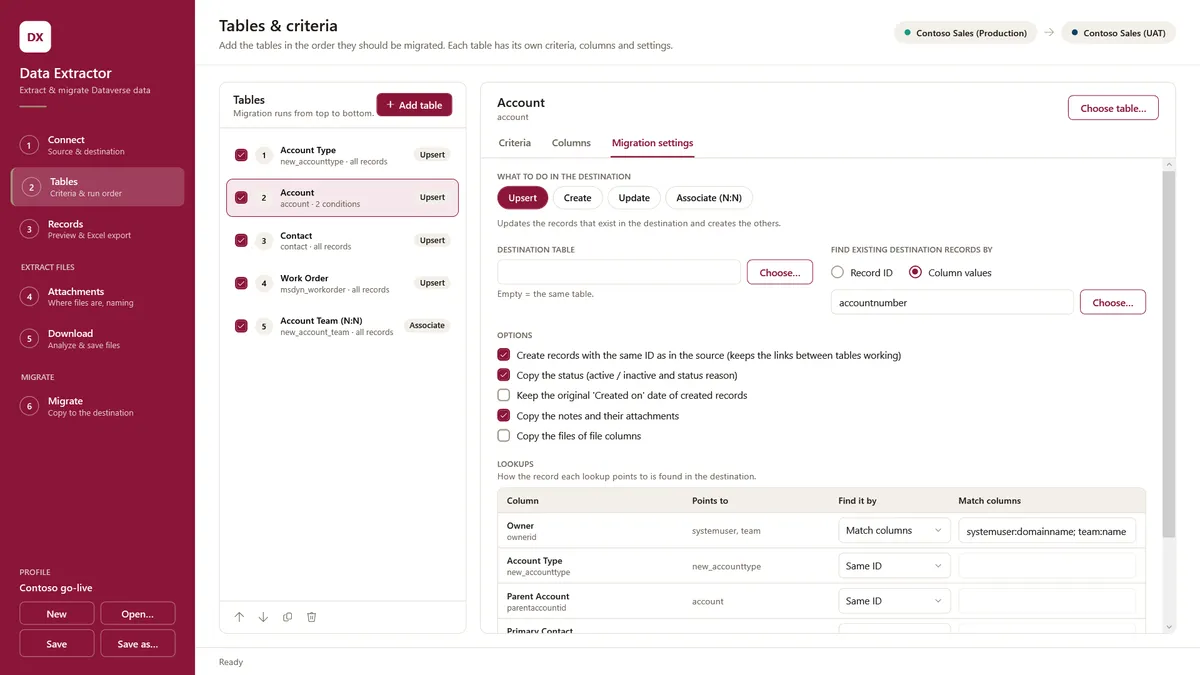
What to do in the destination
Section titled “What to do in the destination”| Operation | What it does |
|---|---|
| Upsert (default) | Updates the records that exist in the destination and creates the others. |
| Create | Creates the records that aren’t in the destination yet. Records that already exist are skipped. |
| Update | Updates the records that exist in the destination. Records that aren’t found are skipped. |
| Associate (N:N) | Links records through an N:N relationship. Choose the relationship’s intersect table as the table. Both records must exist in the destination; pairs that are already linked are skipped. |
Destination table and matching
Section titled “Destination table and matching”- Destination table: leave it empty to use the same table, or select Choose… to write to another table.
- Find existing destination records by:
- Record ID (default): a record exists when the destination has the same GUID.
- Column values: a record exists when all the columns you list are equal, for example
accountnumberorname, accountnumber. Use logical names separated by commas.
Options
Section titled “Options”- Create records with the same ID as in the source (on by default): keeps the links between tables working, because lookups to these records stay valid.
- Copy the status (on by default): copies active or inactive and the status reason.
- Keep the original ‘Created on’ date of created records.
- Copy the notes and their attachments.
- Copy the files of file columns.
Lookups
Section titled “Lookups”The Lookups table lists every lookup column of the table, what it points to, and how it’s found in the destination (Find it by):
- Same ID (default): use the same record ID.
- Match columns: find the destination record by column values. Enter logical names, for example
nameordomainname. For lookups that can point to several tables, set the columns per table:systemuser:domainname; team:name. - Don’t copy: leave the lookup empty.
When the referenced record isn’t in the destination, choose whether to Leave the lookup empty (default) or Fail the record.
Lookups that point to the same table, such as a parent account, are set after the records are written, so the order of records in a table doesn’t matter.